

Why Bolting AI Onto Old Tools Doesn't Work
Most software people use every day — email, docs, spreadsheets, task trackers — was designed for one kind of user: a human, working alone, typing into a single-player interface. AI didn't fit that design, so the industry's answer has mostly been to add a chat window next to it and call it AI-powered.
That fix doesn't hold up. A sidebar can summarize a document, but summarizing isn't participating — anything the AI actually produces stays trapped in the chat log, and a person has to read it, then go make the real edit themselves in the actual document. The assistant and the artifact are two different places, and that gap is the whole problem.
The pattern repeats every time the interface changes
This isn't the first time software has had to be rebuilt rather than patched. Desktop software was built for a single user on a single machine. When the internet arrived, that architecture didn't stretch to fit it — word processors, spreadsheets, and design tools all had to be reconceived as internet-native products, not desktop products with a network cable plugged in. The same shift is happening now, except the new capability isn't connectivity, it's another kind of participant: an AI agent, working alongside a person rather than waiting to be asked.
What "bolted on" actually looks like
In practice, a bolted-on AI feature usually means three things: the AI can't see context outside the single document or thread it's dropped into, its output lands in the chat rather than the document itself, and a person has to manually copy anything useful back into the real artifact before it counts as done. Having a conversation with an assistant was never the problem — losing the thread the moment its answer needs to become an actual edit is.
Built for both, from the ground up
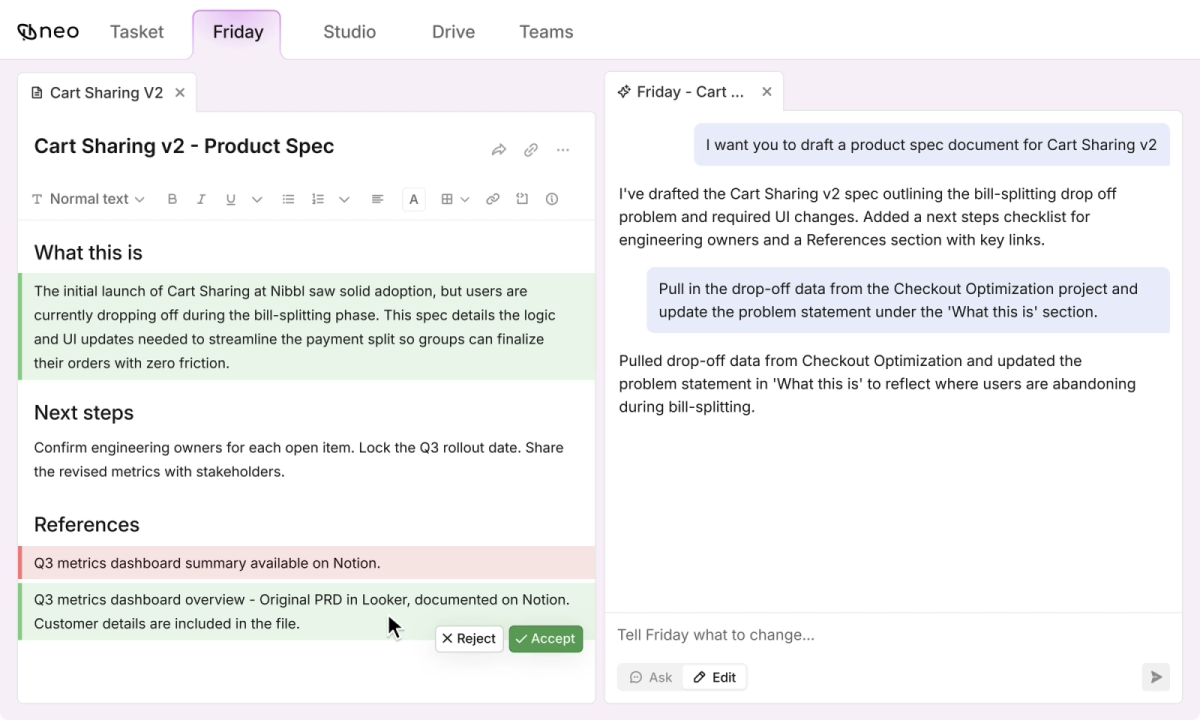
The alternative isn't a workspace without a chat interface — it's one where talking to the agent and the agent's actual output are the same surface. Ask Friday to draft a section, and the draft appears in the document itself, inline, with the same Accept/Reject controls you'd use to review a teammate's suggestion. Nothing has to be copied anywhere for it to count as real.
| Approach | Bolted-on AI | Built for AI and humans |
|---|---|---|
| Where context lives | Scattered across each tool | Centralized, accessible to every agent |
| Where AI's output lands | In the chat, copied over by hand | Directly in the document, inline |
“"Make AI a first-class participant in work, not a tab beside it."”
What changes for a team using it
For a team, the practical difference isn't that AI does more — it's that context stops needing to be re-explained every time it's needed. A task, the document behind it, and the conversation that shaped it live in one place an agent can already see, instead of being reconstructed by hand each time someone — human or agent — needs it.
| Value | Label | Description |
|---|---|---|
| Team by team | Rollout model | Land and expand, not a single big-bang deployment |
| 4 | Suite products | Tasket, Studio, Drive, Friday |
| 1000+ | Integrations | Email, calendars, CRM, HRMS, ATS, ERP systems |
Adoption follows the same logic as the product: one team starts using it, invites the next, and the workspace grows the way any genuinely collaborative tool does — through use, not a mandated rollout.